
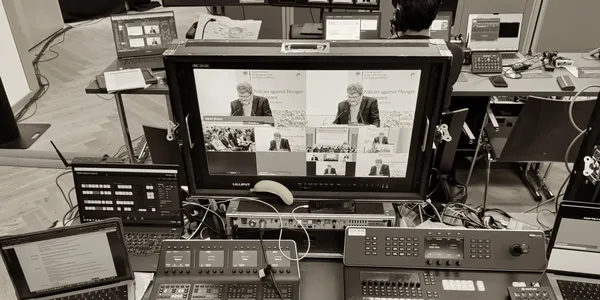
A livestream that runs smoothly looks almost boring on event day – camera on, picture stable, sound clear, done. That boredom is exactly the goal: it's the result of technical decisions made at fixed points throughout the day, not decisions made in a panic when the picture suddenly freezes and 500 people in the chat all type "audio's gone?" at once. A look at the schedule shows which technology comes into play when – and why every minute of it matters.
6:00 AM – Setup: encoder, camera, and switcher take shape
While the venue is still empty and quiet, the day begins with the actual heart of any broadcast: the encoder. It converts the raw camera signal into a streamable format and sends it out into the world at the right bitrate. A good hardware encoder with the SRT protocol works like an airbag for the network: if the connection drops for a few seconds, it catches that and reconnects automatically – nobody in the audience notices a thing.
The camera setup grows in parallel. For a webinar, a single PTZ camera that can be remotely panned, tilted, and zoomed is often enough. For a panel discussion, two to three cameras come into play – a wide shot, a close-up, an audience shot – and for a large conference production, a small broadcast team with its own production director ends up in the control room.
The switcher is where it all comes together: it cuts between camera feeds, slides, and graphics live and in real time. Without it, every stream is stuck with a single, fixed perspective – simply not enough for a professional format.
8:00 AM – Backup internet connection and redundancy
Once the core technology is in place comes the moment that decides between success and embarrassment: securing it. At least two independent internet connections from different providers ensure that a network outage doesn't take the whole stream down with it. A backup encoder and spare hardware for the most critical components come next.
This backup internet connection isn't a nice-to-have for perfectionists – it's standard practice in professional productions. The difference between a cheap streaming offer and a high-quality one is almost never in the picture itself. It's right here: in what the audience never sees.
9:30 AM – Test run: measuring latency, bringing remote speakers online
Connection problems almost always show up the first time you establish a connection – not in the middle of the broadcast, when there's no one left to catch them. That's why a full test run is a fixed part of the schedule, and two things take center stage:
Checking latency. How much delay is acceptable depends entirely on the format. Pure viewer streams can tolerate 5 to 30 seconds of latency without anyone noticing. Interactive formats with Q&A sessions should stay under 3 seconds. And for hybrid conferences, where a speaker is meant to respond live to a comment from the online audience, anything over 2 seconds quickly becomes awkward – that one second of hesitation where both sides aren't sure if the other has finished talking.
Bringing in remote speakers. External speakers can be integrated cleanly into the stream via Zoom, Microsoft Teams, or Webex. What matters in the test run: a dedicated, stable audio channel separate from the room's audio, and a camera position that shows the remote person large and clear – not as a stamp-sized tile tucked in the corner.
Want to stay in the loop?
Subscribe to our newsletter.
11:00 AM – Final adjustments
Now the issues the test run turned up get fixed: an audio track that's a beat out of sync with the picture, a camera angle that isn't quite right in the switcher yet. Anyone who checked the venue's internet connection ahead of time rarely runs into surprises at this stage – the biggest problems almost always show up where that check got skipped.
1:00 PM – Going live: video feed stability during the broadcast
The stream starts – and from now on, only one thing matters: that nobody in the audience notices how much technology is running in the background. A technical team monitors video feed stability throughout and can step in at the first sign of trouble, before it ever becomes visible. Redundant encoders kick in automatically when needed, and the camera position for remote speakers stays steady even if a connection briefly weakens. From the outside, all of this looks like: nothing special. That's exactly the proof that the preparation worked.
5:30 PM – Teardown and wrap-up
The stream ends, the equipment is packed away. What began early in the morning as separate components – encoder, camera, switcher, backup connection – has functioned as a single, coordinated system throughout the day, without anyone in the audience ever noticing a single glitch.
But the real work isn't quite done yet. Wrap-up means securing the recording and delivering it in the required quality – as a download for internal use, for example, or as an edited version for later use. Technical metrics like viewer numbers, connection drops, or latency values during the broadcast get reviewed to plan the next production even more precisely. And last but not least: the equipment gets checked for damage and prepped for its next job.
This exact interplay is part of our communication and transmission technology – tailored to format and venue.
Conclusion
A stable livestream is rarely the result of one good encoder – it's the result of a day planned out hour by hour: from setup through the test run to ongoing monitoring during the broadcast. Anyone who builds latency requirements, a backup connection, and remote integration into the schedule from the start, instead of improvising on event day, delivers a broadcast that simply feels right for both audience and speakers. That's especially true for hybrid conferences, where technical stability directly determines the quality of the interaction.
FAQ
The basics include a camera, an encoder, and, when there are multiple video sources, a switcher. For professional productions, an independent backup internet connection is also recommended – for example via a multi-bonding router that combines several connections (such as LTE/5G and a fixed line) to further secure the broadcast. For hybrid events, remote speakers also need to be technically integrated in both picture and sound.
For simple formats, a single camera or PTZ camera is often enough. Two to three cameras allow for varied perspectives. Larger productions typically use several professional cameras with a dedicated production director.
For classic viewer streams, anywhere from a few seconds up to about 30 seconds is usually fine. For interactive formats, latency should ideally stay under 3 seconds. For direct communication with remote participants, especially low-latency real-time solutions are worth using.